
Last Updated: October 15, 2026
Neck pain from office work is the strain that builds when your head sits forward of your shoulders for hours at a time. At Clarendon Chiropractic, we see this pattern constantly in desk-based professionals across DuPage County. The American Academy of Orthopaedic Surgeons overview of neck pain explains that poor posture places extra load on the cervical spine, and that load adds up quietly over a workday.
Here is the core problem: your head weighs about as much as a bowling ball. Tilt it forward and the muscles at the back of your neck work much harder to hold it up. Do that for six hours a day, five days a week, and the strain becomes your normal.
Most guides tell you to “sit up straight” and stop there. That advice fails because posture is only one piece of the puzzle. Below, we break down the real causes, then give you a 7-step plan you can start today.
Forward head posture is the term for holding your head ahead of your shoulders instead of stacked over them. Every inch forward adds load to your neck muscles and joints.
Your body adapts to whatever you repeat. Sit hunched for months, and the muscles in front of your neck tighten while the ones behind it weaken. That imbalance makes good posture feel uncomfortable, so you slouch again. The cycle feeds itself.
Posture gets the blame, but it is not the only culprit. Other drivers include:
Good office ergonomics for neck pain starts with one rule: bring the work to you, not you to the work. Adjust your setup so your head can rest stacked over your shoulders.
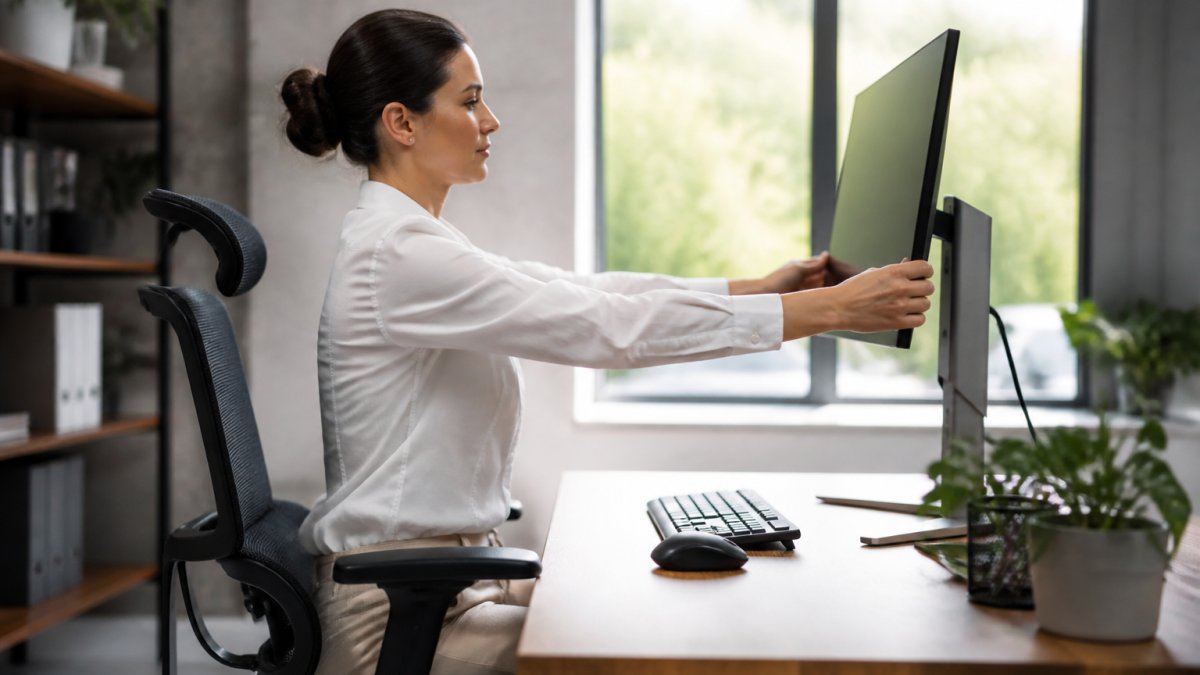
Proper alignment reduces the immediate mechanical strain on your cervical spine, though long-term relief often requires integrating somatic exercises for neck mobility to release the deeper patterns of tension held within your muscles.
The OSHA computer workstation guidance recommends positioning your monitor so the top of the screen sits at or slightly below eye level. That keeps your head neutral instead of tilted down.
A quick checklist for your setup:
Desk stretches for neck pain work best when you do them often, not hard. Set a timer for every 30 to 45 minutes and run through this short sequence.
Move slowly. If any stretch causes sharp pain or numbness, stop and talk to a doctor.
Computer neck pain exercises build the muscles that hold your head up, so good posture becomes easier. Stretching gives relief; strengthening makes it last.
Try these a few times a week:
Start with one set of each. Add sets as you get stronger.
Knowing when to see a doctor for neck pain comes down to red flags. Most desk-related neck pain eases with movement and setup changes. Some symptoms need a professional look.
See a doctor promptly if you notice:
These signs can point to nerve or spine issues that need proper evaluation.
Chiropractic care fits into neck pain relief as a drug-free option that looks at how your spine, muscles, and nervous system work together. The National Center for Complementary and Integrative Health on chiropractic notes that spinal manipulation is generally considered safe when performed by a trained professional.
At Clarendon Chiropractic, we take a different approach than the “crack and go” model some people expect. We combine chiropractic care with functional medicine and use tools like COREscore neurological testing to find the root cause of your pain. That means we look at your posture, stress, sleep, and daily habits, not just the spot that hurts.
If you have tried other chiropractors and felt rushed, this is the difference: a personalized plan built around your history, with lifestyle guidance you can actually use. For desk professionals near Westmont looking for a chiropractor near me, we offer a complimentary consultation to see if we are the right fit.
Start with a workstation reset: raise your monitor so the top third is at eye level, keep your elbows at 90 degrees, and support your lower back. Take a 30-second stretch break every 30 to 45 minutes, even if it is just a gentle chin tuck or shoulder roll. Apply a warm compress for 10 to 15 minutes if muscles feel tight. If neck pain persists beyond a week or two despite these changes, a chiropractor can assess whether joint restriction or muscle imbalance is keeping the pain cycle going.
Yes. Holding your head forward to read a screen loads the neck muscles continuously. Over an 8-hour workday, that sustained low-level contraction can lead to stiffness, tension headaches, and aching at the base of the skull. The fix is not just better posture but frequent position changes. Your neck tolerates movement far better than it tolerates being locked in one spot, so build micro-breaks into your calendar rather than waiting for pain to remind you.
Position your monitor directly in front of you, about an arm’s length away, with the top of the screen at or slightly below eye level. Sit with your feet flat on the floor and your hips slightly higher than your knees. Keep your keyboard close enough that your elbows stay near your sides. If you use a laptop for hours, add an external keyboard and raise the screen. These changes reduce the forward head angle that strains neck muscles.
Chin tucks, shoulder blade squeezes, and gentle neck rotations are the most practical for desk workers. Do 10 slow repetitions of each, holding for 3 to 5 seconds. For deeper support, add a doorway chest stretch to counteract rounded shoulders. These exercises work best when done two to three times daily, not just once. If any movement increases pain or causes numbness, stop and have a professional evaluate you before continuing.
Your neck should not hurt every time you finish a workday. The steps above can help, but lasting relief often needs a closer look at the root cause. At Clarendon Chiropractic, we combine chiropractic care, functional medicine, and COREscore testing to build a plan made for you. Get started with Clarendon Chiropractic and take the first step toward a pain-free workday.


